Showing posts with label trigger. Show all posts

Saturday, July 11, 2020

Applying Lead assignment rule when inserting bulk data from data loader (Trigger solution)

Problem : When inserting lead from data loader lead reassignment rules are                        not working on records.


solution : when you are using lead assignment rules you have to check the                        checkbox Assign using active assignment rule on lead and it                                 works fine . 
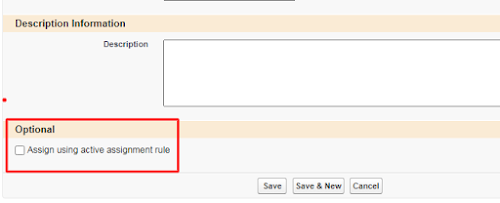

Assignment Rule

Problems arise when you have to insert bulk data. In this case the lead assignment rule does not work . 

So what i do i found this solution by writing after insert trigger on lead . I use apex DML operation. Here useDefaultRule  is the default assignment rule set by the user. 


Here is my code :


,
                   Trigger onAfterInsert on Lead(After insert)
                    public static List<Lead> leads = new List<Lead>();
                        {
                            for (Lead l : Lead_ids)
                                {
                                    leads.add(new Lead(Id = l.Id));
                                }

                             Database.DMLOptions dmo = new Database.DMLOptions();
                             dmo.assignmentRuleHeader.useDefaultRule = true;
                             Database.update(leads, dmo);
                        }


  Thanks,
  Lovesalesforceyes.

Tuesday, June 16, 2020

Apex trigger to Store File type Attachment in Document folder Whenever Article is updated

Trigger Create_Doc on Knowledge__kav (After insert) {
    list<id> ids = new list<id>();
    For(Knowledge__kav k : trigger.new)
    {
        ids.add (k.Id);
    }
    list<Knowledge__kav> recs = [select  Upload__Name__s, Upload__ContentType__s,     Upload__Length__s, Upload__Body__s from Knowledge__kav where id =: ids];
    for(Knowledge__kav k1 : recs)
    {
        Document doc = new Document();
        doc.Name = k1.Upload__Name__s;
        doc.FolderId = '00l2v000002hABpAAM';  // Document folder id
        doc.Body = k1.Upload__Body__s;
        doc.ContentType = k1.Upload__ContentType__s;
        doc.Type = k1.Upload__ContentType__s;      

        insert doc;
    
    }
}


  As I've created one article name "upload file3" with file type attachment "test.txt"


After Update this article file type attachment "text.txt" is inserted in document with folder public images


Thanks,
Lovesalesforceyes.


Saturday, May 30, 2020

Trigger to create new contact when new account is inserted

This post explains how to create a new related contact when account is inserted in salesforce.

⇒ " This trigger creates a new contact(With same account name) whenever new account is inserted ..Number of new contact created is depend on NumberofLocations__c(Account field) and all contact name will be Team_AAA"


trigger Contact_Create on Account (after insert) {
list<Contact> New_Contact = new list<Contact>();
map <ID,Decimal> acc = new map<ID,Decimal>();
for(Account a : trigger.new)
{
  acc.put(a.id, a.NumberofLocations__c);
}
   for(Id x : acc.keyset())
   {
      for(Decimal z=0; z<acc.get(x); z++)
      {
       New_Contact.add (new Contact(AccountId=x, LastName='Team_AAA'));
      }
  }
      insert New_Contact;
}

                   Here I've created one new Account with name Microsoft with NumberOfLocation equals 4


After insert this account trigger will fire and create 4 new contact with name Team_AAA with account name Microsoft


    Thanks,
   Lovesalesforceyes.


Sunday, May 24, 2020

Trigger to prevent creating duplicate accounts in salesforce

This post explains how to prevent creating duplicate accounts in Salesforce.


Trigger :


trigger Prevent_duplicacy on Account (before insert) {

  Set<string> str=new Set<string>();
    for(Account acc:trigger.new)
    {
        str.add(acc.name);
    }
    
    List<Account> acc= new List<Account>([select name from Account where name in:str]);
    
    for(Account a:trigger.new)
    {
        if(acc.size()>0)
        {
            a.adderror('error');

        }
    }
}


As I already have an account named Microsoft in my org.. When I am trying to create a new account with same the name it shows an error.


Thanks,

 Lovesalesforceyes


Get selected radio button value in LWC

This post explains how to get selected radio button in LWC. Below is demo of output : To use the radio button in LWC you have to use the  li...